
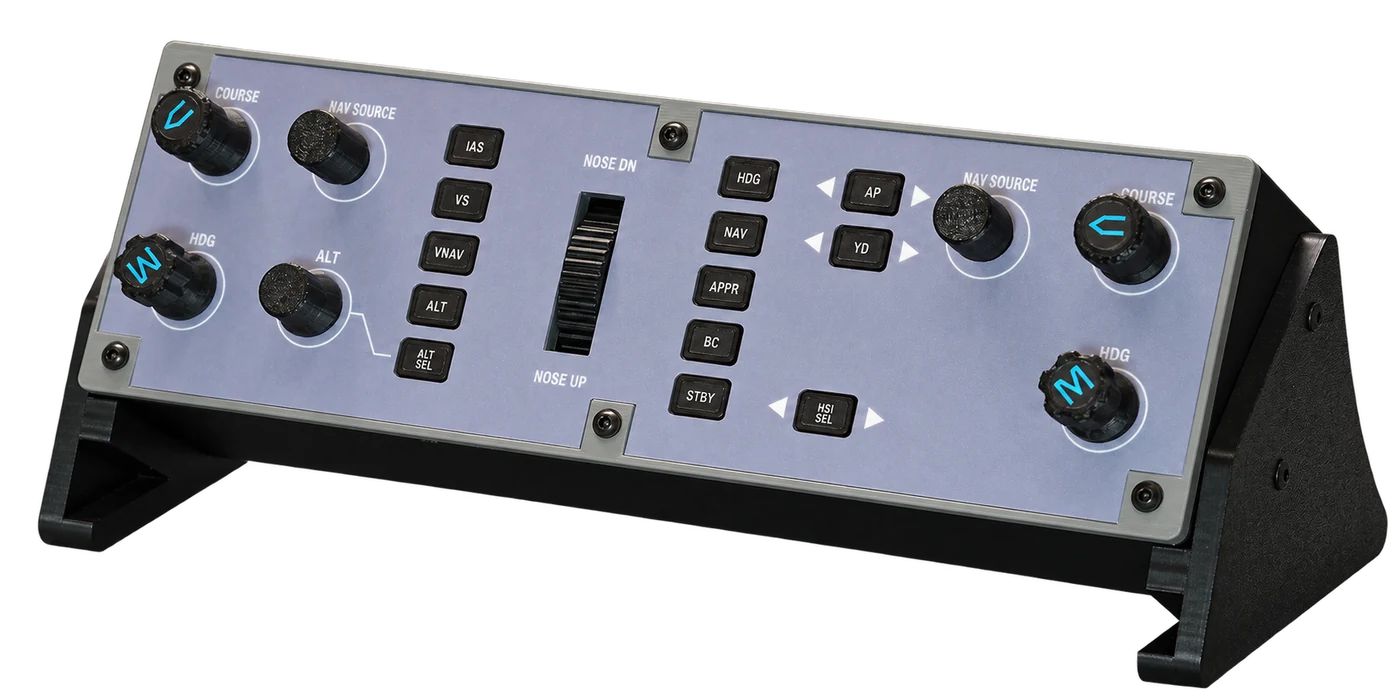
From my first days of Q400 type training to becoming a captain, I have wanted one thing on my desk at home: a Q400 Flight Guidance Control Panel (FGCP).
The reason is simple. When I practise at home, I want to do what I do at work—reach out, turn the heading knob, set the altitude, select a mode—and keep my attention on the aircraft.
That turned out to be harder than it sounds. Dedicated Q400 panels were rare, and the high-end custom hardware I did find cost more than made sense for a working pilot who simply wanted to practise better at home.
So, over time, the wish became a project.
The mouse interrupts the rhythm.
Picture the first few minutes after take-off. The autopilot isn't engaged yet. I'm hand-flying the SID—holding the pitch attitude, tracking the departure, keeping the aircraft where it should be.
Then ATC calls with a new heading or a new altitude.
In the aircraft, the controls are right where I expect them. At home, flying on my own, it looks like this: look away from the instruments, find the cursor, find the knob, hover until the clickable area responds, then adjust it a few steps at a time. If the view is awkward, move the camera first.
It is never just one click. And while my attention is on the cursor, the aircraft keeps flying. Pitch drifts, bank creeps in, and by the time the new value is set, I'm correcting a deviation I created myself.
In a simulator, most autoflight inputs work this way, so a procedure I want to practise as one continuous flow keeps breaking into pieces.
For me, the first value of a physical panel is simple: remove those extra steps, so practice can follow the same rhythm as the real flight deck.
My hands need familiar places to go.
In the real aircraft, every knob has its own feel. The heading and altitude knobs, the two I use most, feel completely different, and after enough hours my fingers know which one they're holding without looking.
A mouse erases all of that. Every control becomes the same cursor and the same click. That's fine for learning what a control does or the order of a procedure. It does little to develop the physical habits a real panel demands.
So on this panel, they don't feel the same either. For the heading and altitude knobs, I've matched the shape and size of the real controls as closely as I could.
At home, I want my hands to return to fixed positions: the same knobs, buttons and pitch wheel, in the same places. Then every step of a procedure has a physical action attached to it.
Set it. Confirm it. Watch the aircraft respond. Move on.
That's also why the layout has to be Q400-specific. General-purpose controllers can do many things, but I want the panel on my desk to keep the arrangement I already know from the aircraft.
There is a place for it beyond professional flying.
As the project took shape, I realised the same panel could matter to people who have never set foot on a Q400 flight deck.
Plenty of simmers love this aircraft. They learn its systems, fly complete sectors, and look forward to the approach and landing as much as any line pilot does.
For them, turning a knob, pressing a button and watching the aircraft respond is a big part of the enjoyment. Physical controls make cockpit tasks feel tangible and draw you further into the flight.
I think there should be an option for an ordinary desk: a standalone panel built around one aircraft, at a price an individual simmer can justify.
I wanted that panel for myself. I'd like other Q400 enthusiasts to have it too.
Building it revealed the details.
Once I started building, I found out how many decisions were hiding inside a panel this size.
The first prototype let me turn real knobs and press real buttons. It also exposed problems no drawing on a screen could have shown me.
Spin the altitude knob quickly, for example, and my hand would stop while the value in the simulator kept catching up, one step at a time. That undermined the very thing I was building the panel to fix. Solving it meant looking at the whole path from the knob to the simulator's response—a story I'll tell in a later post.
The indicator lights raised a similar question. Lighting a button when it's pressed is the easy part. The light also has to follow what the simulator is actually doing, including changes made with the mouse or by the aircraft's own systems.
Problems like these taught me that input, feedback and simulator response have to be designed together.
The hardware went through just as many revisions. How much space should there be between the knobs? How should the pitch wheel be mounted? Where should the labels sit relative to the buttons? How should the backlight illuminate the lettering, and how do you stop light bleeding between indicators? Where should the USB connector go so it's easy to plug in? Every answer had to be worked out in real dimensions and real assembly steps.
Some details are small: the blue markings on top of the COURSE and HDG knobs, or NOSE DN and NOSE UP above and below the pitch wheel. Together, they're what make it feel like a Q400 panel rather than a generic controller.
Cost stayed part of the design the whole way through. I compared circuit board options, revised manufacturing requirements and kept weighing the time needed for printing, assembly and testing. In a small production run, components are only part of the cost; a fiddly assembly adds time to every single unit.
The goal through all of it: a panel that can be built consistently, is easy to live with, and sells at a fair price.
The reason for starting still guides the project.
I fly the Q400 for a living. This project began with a need I'd felt for years: a smoother way to fly the aircraft when practising at home.
Since then, it has moved through a prototype, software debugging and several rounds of circuit board and mechanical revisions. It's now heading into a small production run.
There's still testing and refinement ahead, and I plan to keep documenting it here—what works, what needs changing, and how a desktop panel gets closer to the real thing.
In the end, what I want is simple: to sit down at my home simulator, reach for a familiar knob without looking, turn it, and keep flying the aircraft in front of me.
I hope other people who love the Q400 get to have that experience too.
I'm developing the panel for the Majestic Dash 8 Q400 on Prepar3D and the FlyJSim Q4XP on X-Plane. I'm also following Majestic's MSFS development and plan to work on support once its Q400 becomes available.
If you fly the Q400 at home and want your hands on real controls instead of a mouse, I'm building this panel for you.